
When your Wabbajack installation fails, there is always an error shown in the log right above it. I’ve listed solutions to the most common errors below:
Unable to Source File
Just click retry. Just be aware that AFTER the install is finished, your Mod Organizer.exe will be missing. Run the install again pointing to same location to repair and finalize it.
Unable to Download or OAuth Token Errors
This usually happens due to 3 reasons:
- You did not login to Nexus inside Wabbajack and got IP banned for 10 minutes. Make sure you login and wait for the IP ban to go away.
- You have a VPN on and Nexus is blocking the download. Simply turn off the VPN.
- You are in a region/country with strict internet access, and your Nexus/GitHub downloads are being blocked/limited
- You have spotty internet and are unable to download the large files properly. Just keep hitting retry or reset your router or something.
I really don’t want to go through this whole loop every time someone with shitty internet tries downloading Genesis. If you are unable to download x file numerous times in a row, and then I go and download that file fine the first try, then clearly it’s one of the 4 above reasons.
Stuck Download
Just close the installer and restart it again, pointing to the exact same location as last time. This will resume your download/install as normal.
If the above doesn’t work, then go into the Genesis downloads folder and delete the specific mod that keeps getting stuck. Then, go and clear the Wabbajack cache:
- Close Wabbajack if it’s open and press Windows + R on your keyboard. Type in %localappdata%. You should see a Windows Explorer window pop up. Find and delete the folder called Wabbajack inside.
Now open and close Wabbajack around 3-5 times and try again to download the modlist. It will resume where it left off and should not get stuck on that file anymore.
Can’t Find Game Starfield
This could be caused by a variety of reasons. I’ve listed the most common ones below and what you can do to fix them:
- You do not have a Steam version of Starfield
- You have 2 different Steam installations. Wabbajack is getting the location from the first Steam installation which expects it to be in the default Program Files (x86) location. You must uninstall one of the Steam uninstallations.
- You have a pirated Starfield, which Wabbajack has a safeguard for. Can’t help you there.
Unable to hash AAAAA
This is an old fashioned corrupted file error. You must delete the downloads folder and create a new one, then reinstall.
Could not find part of the path “TEMP_BSA_FILES”
This is typically caused by a problem extracting zip files. The quickest resolution is as follows:
- Close Wabbajack
- Go to the Star Wars Genesis\Game folder and locate the TEMP_BSA_FILES folder if it exists.
- Empty the INSIDE of that folder if it exists.
- Restart Wabbajack
- Restart modlist installation (this will resume where it left off)
If you are using a fucking 3rd party Wabbajack install that autoclicks for you, then it can also cause this issue. Stop being dumb.
Access Denied Error
This is usually caused by some third party antivirus such as Norton, AVG, McAfee, Avast, etc. You must whitelist the Star Wars Genesis folders or completely turn off your antivirus until the install finishes. I don’t know what happens if you re-enable your antivirus after the install though.
“You can’t run Wabbajack as Admin” Error
This a non-default Windows setting you have to lower/change. Either you or someone else that managed/used your PC raised this and it’s preventing certain apps from running properly. Just type this in the Windows Search bar, open it, and lower the bar.
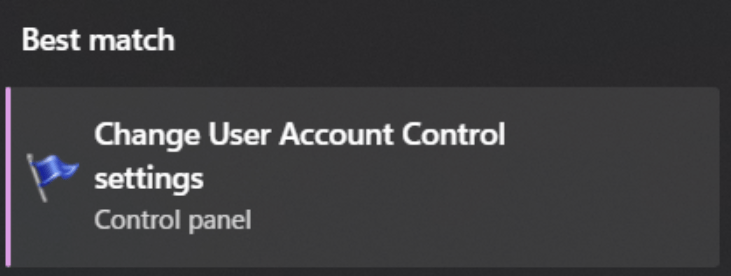
Unable to Download Data_Starfield-Textures0X.BA2 (GameFileSource…)
This is caused by a corrupted game folder. Delete the files mentioned in the log from your Starfield folder and then repair your game through Steam. Then relaunch Wabbajack and resume the download/install.
Disk I/O Error
Either your SSD is full/near full or you have an application called AMD StoreMI or some other type of performance boosting app. Please uninstall them.
Blank/White Nexus Login page
This is caused by not having Microsoft Edge or missing a portion of Edge, which you should have on any default Windows installation. This is honestly more of a lesson on why you shouldn’t uninstall core Windows programs that make no difference keeping. They have important libraries and apis that are required for many programs. If none of the solutions on this page help you, refer to Wabbajack Discord Support but they’re probably just going to tell you to reinstall/repair Windows if none of the below works.
- Reinstall Microsoft Edge: https://www.microsoft.com/en-us/edge/download?form=MA13FJ
- Download and install WebView2 Runtime: https://developer.microsoft.com/en-us/microsoft-edge/webview2/?form=MA13LH
- Try the steps on this page if the two above steps don’t work: https://superuser.com/questions/1751709/how-to-reinstall-microsoft-edge-webview2-runtime
 Star Wars Genesis