General Mod Organizer Fixes
Most of the time, Mod Organizer issues are between your PC and Mod Organizer. It’s usually not an issue with the modlist itself. You should do everything in here to rule out any security/driver issues.
- Make sure your VC++ is properly updated. Download the All-in-One from here. Extract the
install_all.batinto the same drive you have the modlist on and run it. - Next, go through an install (or a repair if available) of this. To be safe, drag this exe into every drive you have and run it.
- Under Virus and Threat Protection Settings (Windows Security), go to “Manage Controlled Folder Access” whitelist these applications/folders:
- /steamapps/common/Starfield/Starfield.exe
- /StarWarsGenesis/game/ModOrganizer.exe
- /Documents/My Games/Starfield
- Make sure you have installed the latest version of .NET Framework
- Start Powershell
- CD to your install location. Example would be: cd “C:\Star Wars Genesis”
- Run this command: dir -Recurse | Unblock-File
- If you have any other antivirus besides Window Defender, please refer to this page
- Please check this list and make sure you don’t have any incompatible apps.
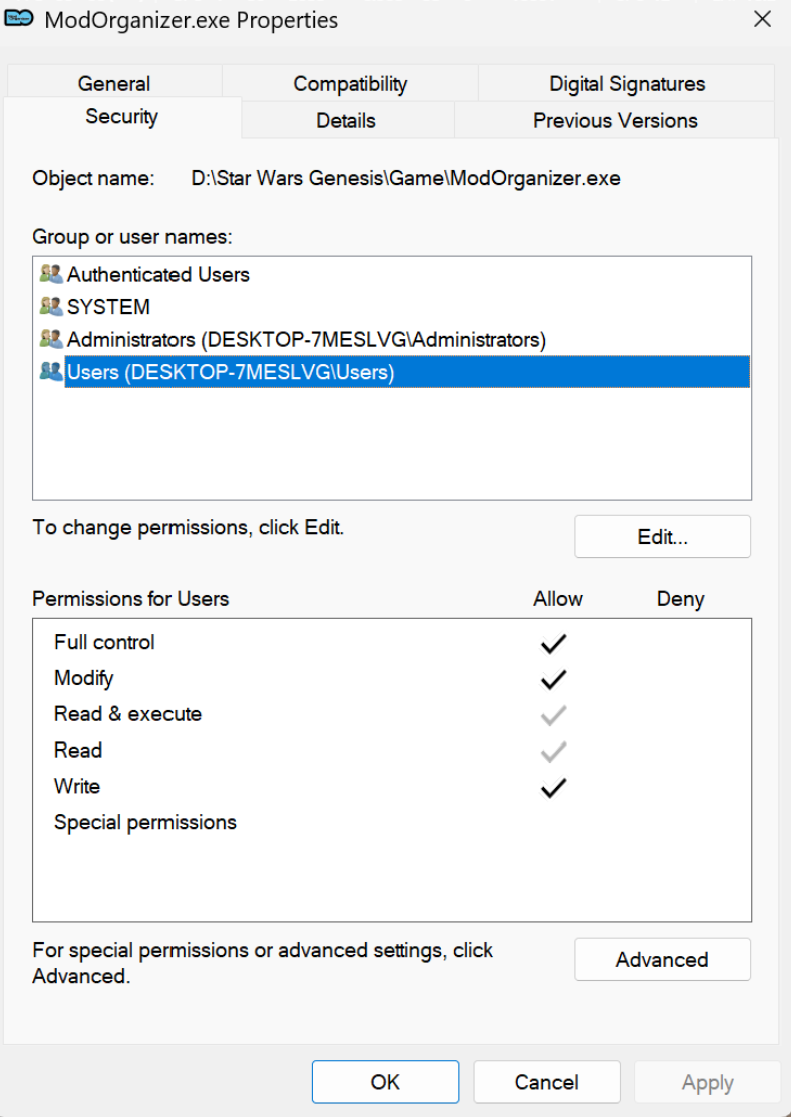
- Edit the properties of /StarWarsGenesis/game/ModOrganizer.exe and give it Full Control for all users. Do the same for /steamapps/common/Starfield/Starfield.exe.
- If you are still having issues after all this, please make sure your computer’s Documents folder isn’t in a non-English language that has special characters such as Hebrew, Chinese, Sanskrit, etc. This has become too common of an issue.
- If you’re unsure how to change it, open Registry Editor through the Windows Search bar and navigate to: Computer\HKEY_CURRENT_USER\Software\Microsoft\Windows\CurrentVersion\Explorer\User Shell Folders and double click + edit the special character name you see to \Documents instead of \$%@*%$@ or whatever special character language it’s in.
- Restart your PC 1-2 times if you did any of the above steps
Beyond this point, if the modlist is still failing to launch, you’re reaching the realm of me being unable to help you. While Genesis works fine for thousands of people, there is always a very small minority that can never get it working on their PC for some reason. Below are a list of fixes that some people have shared with me days/weeks later:
- Misconfigured security settings. By default, you shouldn’t run into any security/admin settings preventing Genesis from running on your PC. If you specifically remember messing with group policies or admin settings on your PC a long time ago, there’s a high chance that is what’s causing issues. I’ve been told you can edit the folder security settings of these folders below and grant the “Everyone” group full control:
- Star Wars Genesis folder
- Starfield Documents folder
- Starfield folder
- Drive Corruption. Specifically if you see a SFSE Plugin Loader error popup when trying to launch the game. The last user that had this issue found out his drive was corrupted, moved his modlist/game to another drive, and got it working.
- AVX2 is disabled. There are only two scenarios where AVX2 can be disabled. Either it’s purposefully disabled it in the BIOS, or a very old CPU is being used (such as an i5-2500k). Most modern CPUs have AVX2 by default.
- OS issues. User was unable to run Mod Organizer at all until they reinstalled their OS. Something with their file structure was messed up.
Side by Side Configuration Error
This is related to outdated/corrupted VC++. Try downloading the .exe installer for Mod Organizer 2.5.2 from here and install it into the /Star Wars Genesis/Game folder. it should fix the issue.
 Star Wars Genesis