Launch Crashing
If the answer is NO to the following question, then simply scroll down to the next question
Is your \user\Documents\My Games\Starfield folder missing a file called DeityVengy was here.ico in it?
If yes, then you did not run genesis_documents.bat per the installation instructions. If you distinctly remember doing so, then I apologize. Click here.
Do you have a 3rd Party Anti-Virus like McAfee, Norton, BitDefender, Total Ultimate Defense, etc?
If you do, then your crashing is 100% because of this. I promise you that your antivirus is not special and will give a false-positive like everyone else’s antivirus. I have helped people for hours/days only find out they had x antivirus and didn’t read this page. Please double check and read this page for more information. If you still can’t launch the game after following the instructions there, make sure you mention what antivirus you have in the help section of the Discord.
Do you have any of these incompatible apps running on your PC?
You can find a list of all incompatible apps for Genesis here. If you have any of these apps, simply end their process. You don’t have to uninstall them.
Do you have red exclamation mark symbols in the plugins tab of your Mod Organizer 2? Use these pictures as a reference (ignore the plugin count)
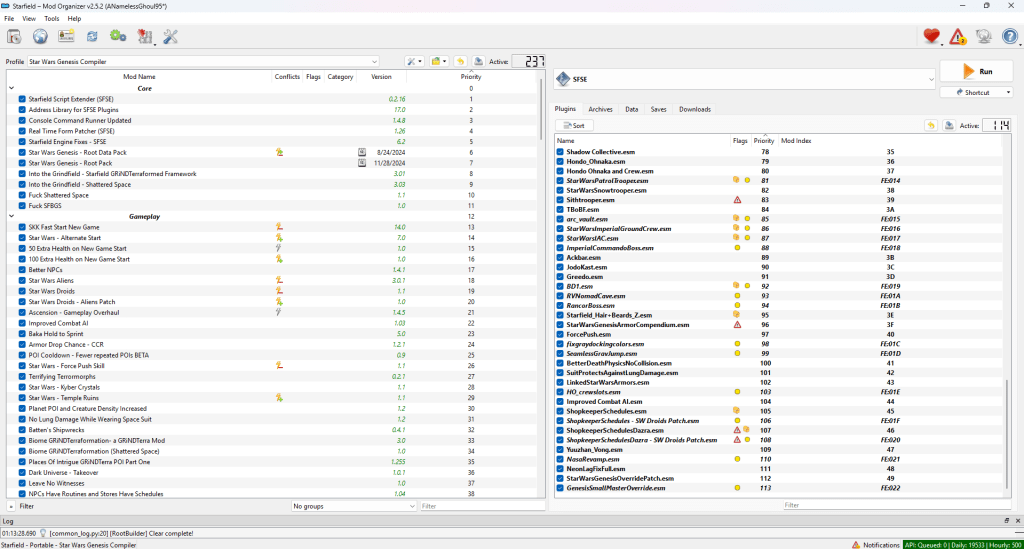

If YES, then you do not have the Shattered Space DLC. Please buy and install it. Then close Mod Organizer and reopen it. If you DO have the Shattered Space DLC and still see these red exclamation marks in the PLUGINS tab, make sure you have it installed through Steam.
If NO, then please try launching the vanilla game through Steam. Does that crash too? If yes, delete the entire Starfield folder and reinstall it through Steam. This will not touch the modlist or your saves.
If none of these other issues apply to you, then please join the Discord
 Star Wars Genesis